7. Algorithm Design and Problem Solving
SECTION 2: ALGORITHMS, PROGRAMMING AND LOGIC
Important Note
These notes cover the main points for revision. They are great for reviewing key concepts, but for in-depth understanding, always keep your textbook nearby for reference.
Algorithm design and problem solving are fundamental skills in computer science. This chapter covers the Program Development Life Cycle, decomposition techniques, design tools (structure charts, flowcharts, pseudocode), and common algorithms for solving problems.
Table of Contents
7.1 Program Development Life Cycle
7.2 Systems and Decomposition
7.3 Design Tools
7.4 Algorithms & Testing
7.1 Program Development Life Cycle
The Program Development Life Cycle (PDLC) consists of five key stages that guide the development of software from initial concept to final implementation and maintenance.
- 1. Analysis
- 2. Design
- 3. Coding
- 4. Testing
- 5. Maintenance (covered in Chapter 8)
7.1.1 Analysis
The purpose of analysis is to understand what the program needs to do. The result is a requirements specification — a clear definition of the program's goals.
Techniques used in analysis:
Abstraction
Focus only on important details, removing anything unnecessary.
Example: A map only shows roads, not trees or benches.
Decomposition
Break down a large problem into smaller parts.
Example: Getting dressed → Select clothes → Remove current clothes → Put on new clothes.
7.1.2 Design
Design converts the analysis into a plan for how to solve the problem. It outlines:
- • Tasks to be completed
- • How each task will be done
- • How tasks interact
Common design tools:
Structure Charts
Show modular breakdown of a system
Flowcharts
Visual representation of algorithms
Pseudocode
English-like syntax describing steps
7.1.3 Coding and Iterative Testing
- •Writing the program using a high-level language (e.g. Python, Java)
- •Each module is developed and tested individually
- •Iterative testing: Repeating testing and improving until the module works correctly
7.1.4 Testing (Final Stage)
- •Testing the complete program using a variety of test data
- •Ensures that all modules work together and meet the original specification
7.2 Computer Systems, Sub-systems and Decomposition
7.2.1 Computer Systems and Sub-systems
A computer system consists of:
- • Hardware
- • Software
- • Data
- • People
- • Communications
Top-down design:
- • Break system into smaller sub-systems
- • Break sub-systems down further into subroutines
- • Use structure diagrams to show hierarchy
Benefits:
- • Multiple programmers can work in parallel
- • Makes development faster and more manageable
7.2.2 Decomposing a Problem
All computer systems can be broken down into four parts:
1. Inputs
What data is entered into the system?
2. Processes
What operations need to be done?
3. Outputs
What information is produced?
4. Storage
What needs to be saved for future use?
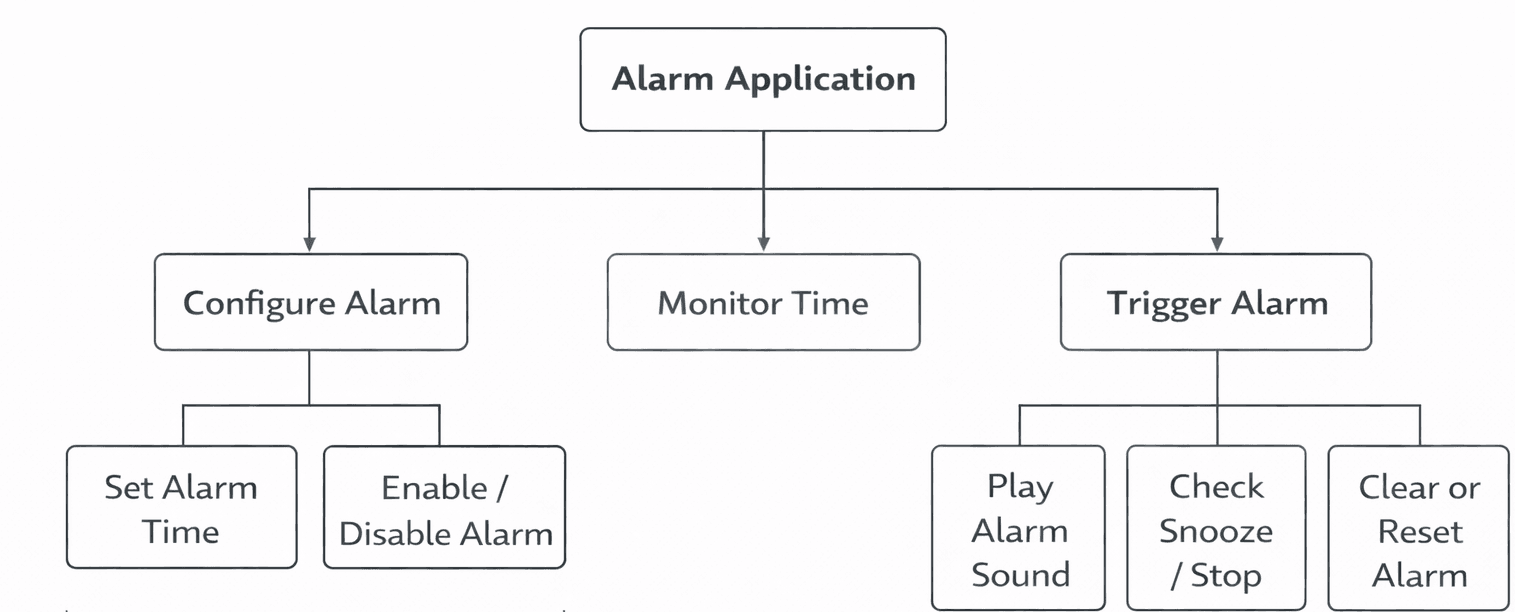
Example: Alarm App
- • Inputs: Set alarm time, press snooze, etc.
- • Processes: Check current time, manage snooze logic
- • Outputs: Sound the alarm
- • Storage: Save alarm settings
7.3 Design Tools
Structure Diagrams
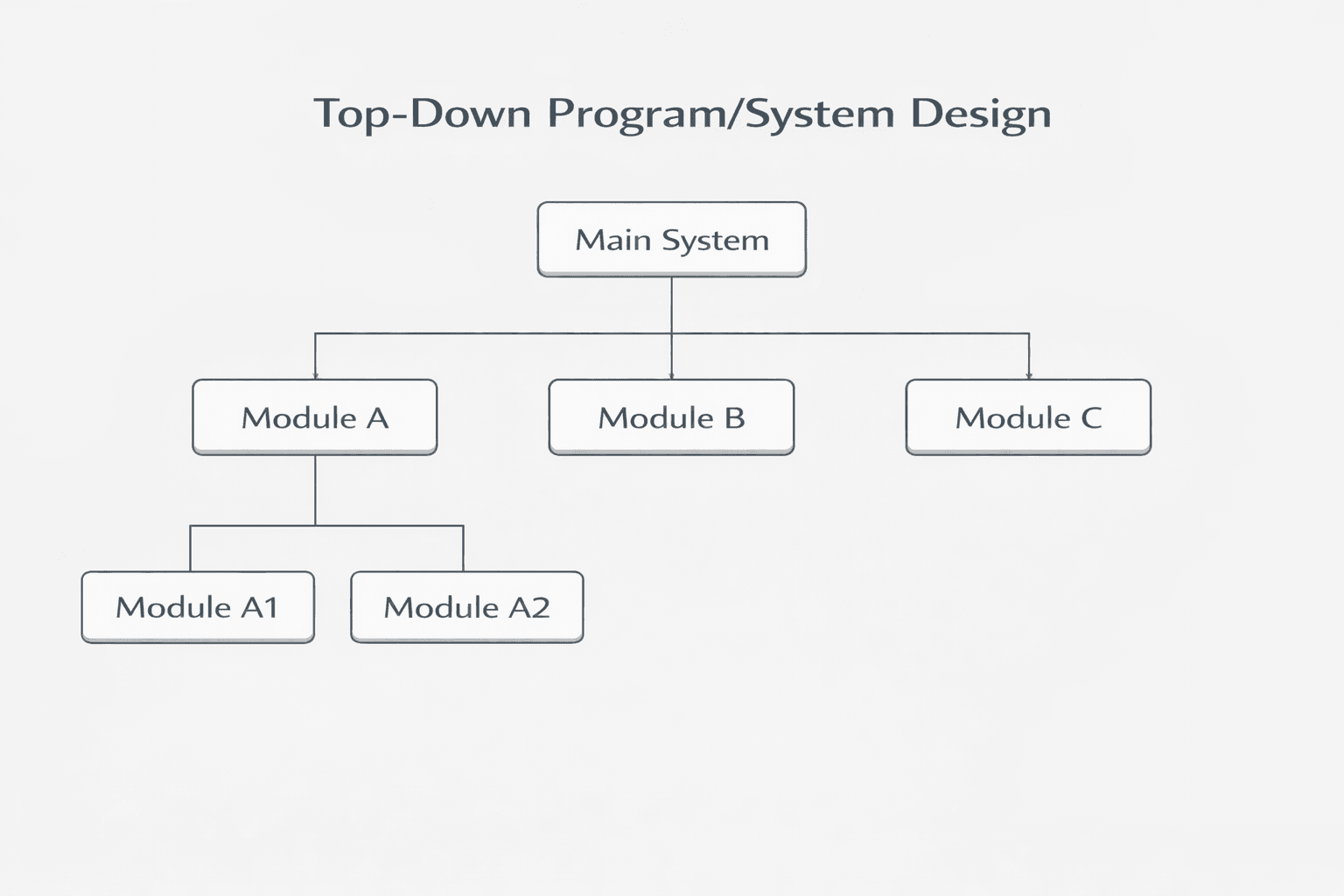
Note: Structure diagrams (also known as structure charts) show the hierarchical breakdown of a system into modules and subroutines. They illustrate how a system is decomposed from top to bottom.
Structure diagrams use boxes to represent modules, with lines showing the relationships between them. The top box represents the main program, and lower boxes represent subroutines or modules.
Key Point: A subroutine is a named block of code that performs a specific task and can be called from other parts of the program.
Flowcharts
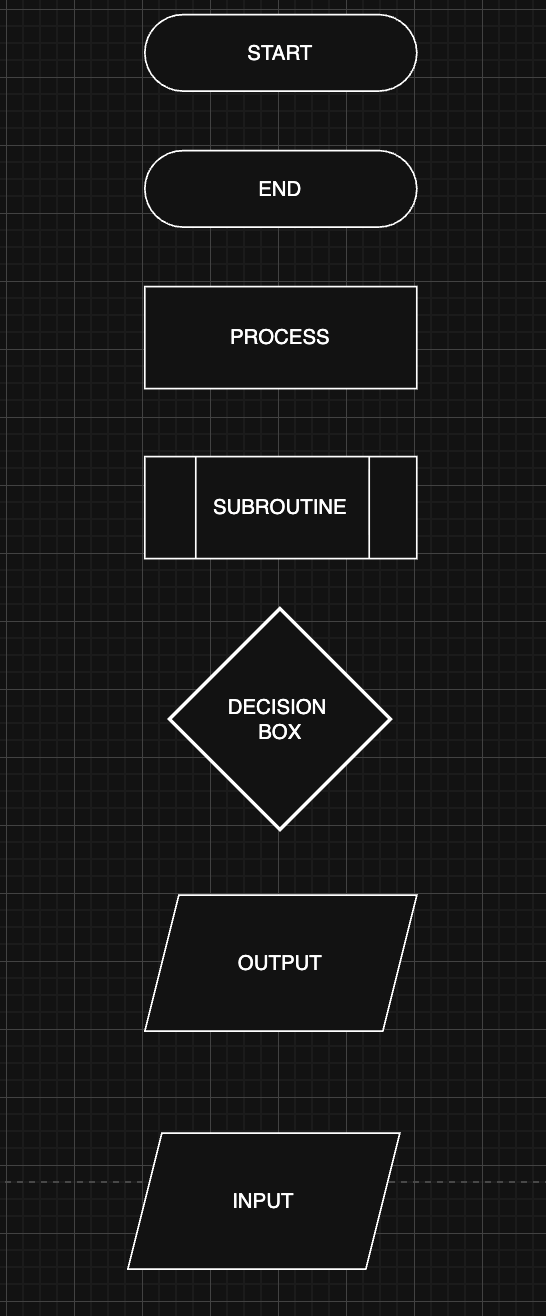
Flowcharts use standardized symbols to represent different operations in an algorithm:
Oval: Start/Stop
Rectangle: Process
Diamond: Decision
Parallelogram: Input/Output
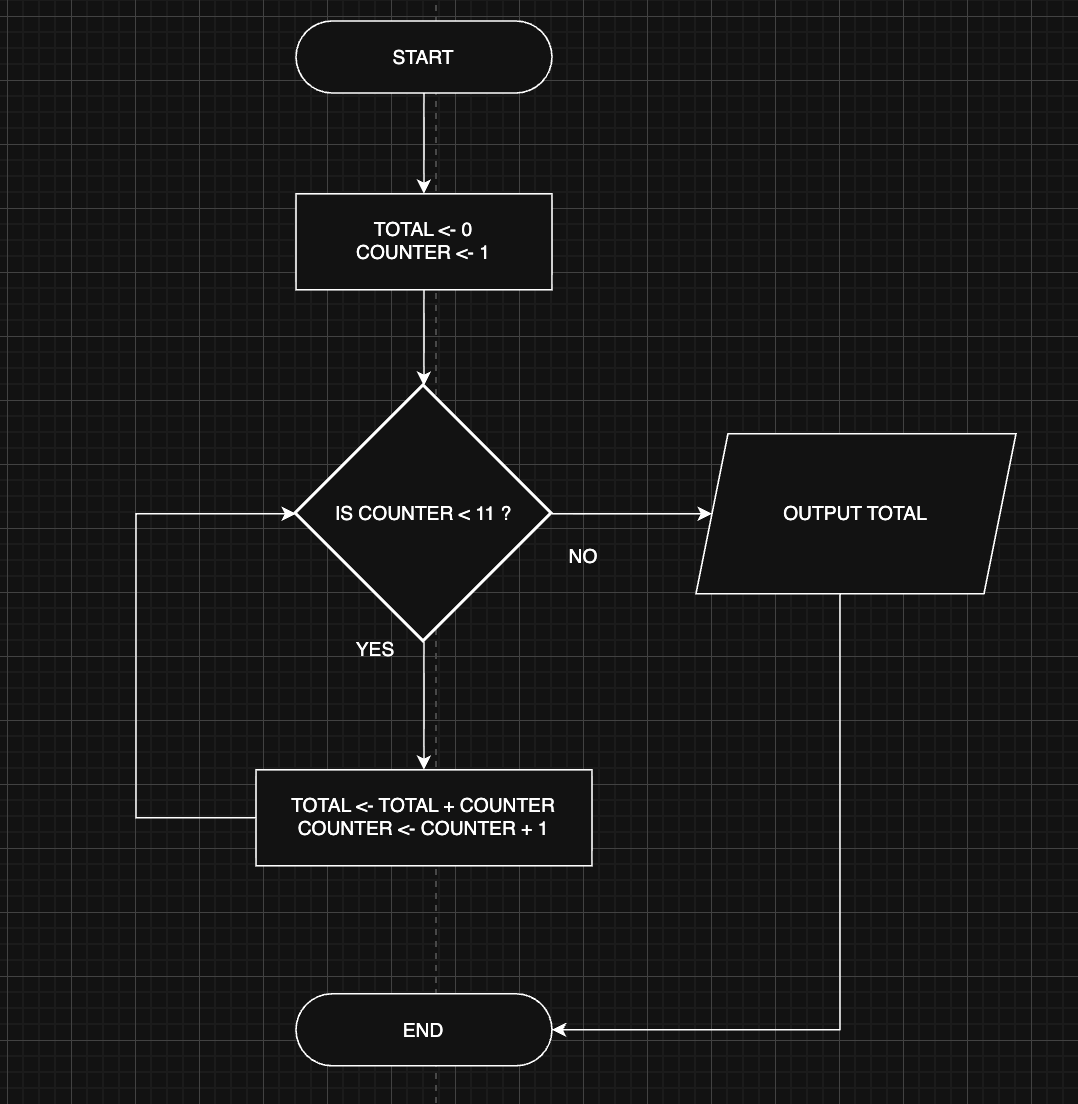
Example: Calculate Total of First 10 Numbers
This flowchart demonstrates a common algorithm pattern using a loop with a decision to calculate the sum of numbers from 1 to 10.
7.4 Pseudocode
Pseudocode is a simplified method of writing algorithms using English-like syntax. It is not constrained by the strict syntax rules of programming languages but mimics their structure to make algorithms easy to understand.
1. Variables and Assignment
Variables in pseudocode are used to store data. Assignment is done using the ← symbol.
Example:
In the above example, the variable PRICE is assigned the value 100, and NAME is assigned "Kunal".
2. Input and Output
- • Input: Used to receive data from the user
- • Output: Used to display information to the user
Syntax:
Example:
Important Note for Exams:
In exam questions, especially in error detection questions, some past papers might use the word "print" instead of "OUTPUT". Please understand that this is NOT an error. Both terms mean the same thing - they are used to display information. When you see "print" in a question, treat it the same way you would treat "OUTPUT".
3. Conditional Statements (IF, ELSE)
Conditional statements are used to perform different actions based on a condition.
Syntax:
Example 1:
Example 2:
Example 3:
4. Case Statements (CASE, OTHERWISE)
CASE statements allow multi-way branching, selecting actions based on the value of a variable.
Syntax:
Example 1:
Example 2:
Difference Between CASE and Nested IF Statements
CASE OF Statement
Used when there are multiple possible values for a single variable. Cleaner and more readable.
CASE OF Grade
    "A": OUTPUT "Excellent"
    "B": OUTPUT "Good"
OTHERWISE
    OUTPUT "Improvement Needed"
ENDCASE- ✓ Cleaner and more readable
- ✓ Faster to write
- ✓ Easier to maintain
Nested IF Statement
More flexible, can handle complex conditions that don't rely on just one variable.
IF GRADE = 'A' THEN
    OUTPUT "EXCELLENT"
ELSE
    IF GRADE = 'B' THEN
        OUTPUT "GOOD"
    ELSE
        OUTPUT "Improvement Needed"
    ENDIF
ENDIF- ✗ More complex and less readable
- ✗ More prone to errors
- ✗ Requires more lines of code
Which to Use? Use CASE when comparing the same variable against different specific values. Use nested IF when you need to compare multiple conditions or perform different checks.
💡 Important: Also check the book for Validation and Verification - HIGHLY RECOMMENDED!
5. Loops (FOR, REPEAT, WHILE)
Loops are used to repeat sections of code.
FOR Loop (Count Controlled Loop)
Repeats a block of code a set number of times.
Syntax:
Example 1:
Example 2:
Example 3: Descending Order
Use STEP -1 to count downwards.
REPEAT UNTIL Loop (Postcondition/Exit Controlled)
Repeats until a condition becomes true. Always executes at least once.
Syntax:
Example 1:
Example 2:
WHILE Loop (Precondition/Entry Controlled)
Repeats while a condition is true. May not run at all if condition is false initially.
Syntax:
Example 1:
Example 2:
Difference Between REPEAT and WHILE Loops
REPEAT...UNTIL
- • Always runs at least once
- • Checks condition after executing code
- • Exit controlled loop
WHILE
- • May not run if condition is false initially
- • Checks condition before executing code
- • Entry controlled loop
Example: Password Verification
This example shows the same logic implemented with both loop types.
WHILE Loop
REPEAT...UNTIL Loop
6. Common Algorithms
Counting
Used to keep a count of occurrences.
Finding Maximum and Minimum
Used to find the largest or smallest values in a set.
Linear Search
Used to search for an item in a list.
String Manipulation in Pseudocode
Printing Characters Letter by Letter
Printing Adjacent Character Pairs
Menu-Driven Programs
Menu-driven programs use a REPEAT loop to display options and execute different actions based on user choice.
Past Paper Question: Algorithm Maintainability
Past PaperQuestion (b): A programmer has written a program that will be maintained by another programmer. Explain how the program can be written to make sure it can be easily maintained by the other programmer.
Answer:
- •Meaningful identifiers: Use descriptive names (e.g., using
Numberinstead ofN). - •Comments: Add explanations (e.g.,
// loops until the guess equals the number). - •Procedures/Functions: Break the algorithm into smaller subroutines/procedures.
7.5 Arrays
An array is a fixed-length structure that stores multiple items of the same data type.
Array Declaration
One-Dimensional Arrays
Two-Dimensional Arrays
Array Assignment
Single Element Assignment
Using Loops to Fill Arrays
Two-Dimensional Array Initialization
7.6 Validation and Verification
Validation
Validation checks whether data is reasonable before being processed.
Types of Validation Checks:
- • Range checks
- • Length checks
- • Type checks
- • Presence checks
- • Format checks
- • Check digits
Range Check
Example 1:
Example 2:
Length Check
Example 1:
Example 2:
Format Check Examples
Product Code Validation (Length = 6):
Product Code Validation (Must start with "PD"):
Alternative using WHILE:
Verification
Verification is checking that data has been accurately copied from one source to another – for instance, input into a computer or transferred from one part of a computer system to another.
Methods of Verification:
• Double entry: The data is entered twice and compared
- • Screen/visual check: User visually checks the data on screen
7.7 Test Data
Before confirming that a program or system works correctly, it needs to be tested. Testing ensures that:
- • The solution performs as expected
- • Errors are detected and corrected before implementation
A set of test data is all the data items required to work through a solution.
Example: If a program calculates the average of 10 exam marks, a set of test data might include 10 values like 50, 60, 70, 80, 90, 50, 60, 70, 80, 90.
Testing must include multiple sets of data to fully check all possible cases.
Types of Test Data
| Type | Purpose | Example | Expected Result |
|---|---|---|---|
| Normal Data | Data the program is expected to handle during normal operation | 50, 60, 70, 80, 90, 50, 60, 70, 80, 90 | Average = 70 |
| Abnormal (Erroneous) Data | Data that should be rejected as invalid or not suitable | -12, "eleven" | Both rejected as invalid |
| Extreme Data | Data at the upper and lower limits of the valid range | 0, 100 | Both accepted as valid |
| Boundary Data | Data just inside and just outside the limits of the valid range | For 0–100 range: -1, 0 | -1 rejected, 0 accepted |
Example Summary
For an algorithm to find average percentage marks (0–100):
- • Normal data:
40, 50, 60→ expected average =50 - • Abnormal data:
5, 120→ should be rejected - • Extreme data:
0, 100→ accepted - • Boundary data:
1rejected,0accepted;100accepted,101rejected
7.8 Sorting and Searching Algorithms
Bubble Sort
Bubble sort is a simple sorting algorithm that repeatedly steps through the list, compares adjacent elements, and swaps them if they are in the wrong order.
Linear Search
Linear search checks each element in a list sequentially until the target item is found or the list is exhausted.
Chapter Summary
This chapter covered the Program Development Life Cycle (Analysis, Design, Coding, Testing, Maintenance), decomposition techniques, design tools (structure charts, flowcharts, pseudocode), common algorithms (counting, finding max/min, linear search, bubble sort), arrays, validation and verification, and test data types. Understanding these concepts is essential for IGCSE O Level Computer Science.